We’ll be using the AD DS MMC Profile for this section.
Establishing the OU Structure
Expand the AD Users and Groups to see the base structure.
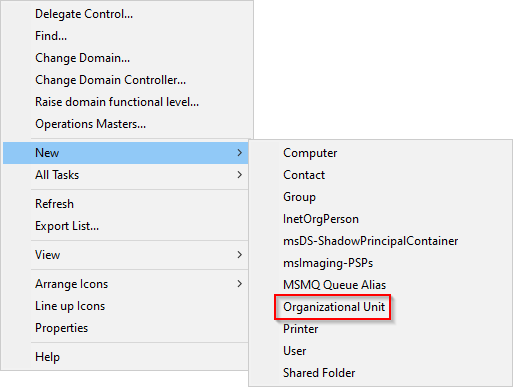
In the blank space, right-click and hover on New and select Organizational Unit.
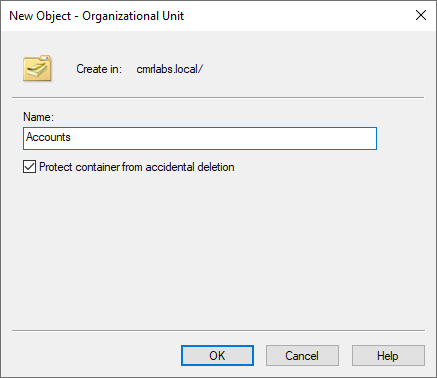
Enter the name for the first OU of Accounts.
Continue to create the OUs listed below (skipping the ones that already exist):
mydomain.local
- Accounts
- Computers
- Servers
- Workstations
- Groups
- Distribution
- Security
- Users
- !DisabledUsers
- Admins
- Users
- Computers
- Resources
- Groups
- Users
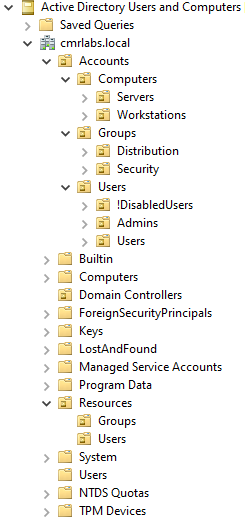
Verify that your tree matches what’s displayed below.
User Account Cleanup
Move the following accounts/objects as directed.
!DisabledUsers OU
Users\Administrator » Accounts\Users\!DisabledUsers
Users\Guest » Accounts\Users\!DisabledUsers
Admins OU
Users\John.Smith » Accounts\Users\Admins
Organization Complete!
We’ve successfully created our initial Organization Units!
Please make your way to the next section, where we’ll be configuring User Accounts!